Best Recipe Costing Software for Small Food Businesses
The most common financial problem facing small food businesses isn't high rent or rising ingredient costs — it's underpricing. And underpricing almost always traces back to the same root cause: not knowing what products actually cost to make. Recipe costing software fixes that. Here's what to look for, what's available, and what makes a tool genuinely useful for a small operation.
Why so many small food businesses are flying blind on food costs
Ask a small food business owner how much their bestselling product costs to make and you'll get one of three answers. A confident figure that hasn't been updated in eighteen months. A rough estimate based on the biggest ingredients but missing the smaller ones. Or an honest "I'm not entirely sure."
None of these is a sustainable position for a business that needs to make money. Food costs are dynamic — ingredient prices change constantly, batch sizes vary, and a new supplier can alter your margin without anyone realising. When your pricing is based on stale or estimated costs, every price increase you haven't made is a contribution to someone else's margin rather than your own.
The solution isn't complicated in principle. You need to know what every ingredient costs per gram, what your recipe uses of each, and therefore what every product costs to produce. Our complete recipe costing guide walks through the methodology in detail. The challenge for most small food businesses isn't the maths — it's maintaining the data. And that's exactly what recipe costing software is built to solve.
The real cost of guessing your food costs
Pricing decisions made on estimated or outdated food costs have compounding consequences. The most immediate is margin erosion: you sell products at prices that felt right when you set them but are no longer profitable given current ingredient costs. Since the change happened gradually, it's easy to miss until the cash flow starts to feel tight in a way that doesn't quite match your revenue.
The second consequence is asymmetric risk. When you're guessing your costs, you tend to underestimate — because the instinct is to be optimistic, and because the smaller ingredients are easy to overlook. A thorough understanding of food cost percentage and what it means for your margins is the foundation of profitable menu pricing. Software makes maintaining that understanding effortless rather than laborious.
The third consequence is an inability to make good decisions when things change. If butter prices jump 20%, you need to know which products are most affected and by how much before you can decide whether to absorb the increase, adjust prices, or substitute an ingredient. Without accurate, real-time cost data, you're making that decision in the dark.
What recipe costing software actually does
At its core, recipe costing software maintains a library of ingredients, each with a cost per unit or per gram. You build recipes from that library, specifying quantities. The software calculates the total ingredient cost of each recipe automatically — and keeps that calculation current as ingredient prices change.
The important word is "automatically." The difference between a recipe costing tool and a spreadsheet isn't that one does maths and the other doesn't — spreadsheets do maths fine. The difference is that a recipe costing tool maintains the relationships between ingredients and recipes, so that when an ingredient price changes, the cost of every recipe using that ingredient updates immediately. In a spreadsheet, you'd have to find every affected formula and update it manually. In a costing tool, you change it once.
For small food businesses, the features that matter most are:
- Ingredient library with cost per gram or unit — the foundation of everything. Each ingredient entered once with its cost, and used across as many recipes as needed.
- Recipe builder — specify quantities of each ingredient and the tool calculates the total ingredient cost. Adjust the batch size and costs scale accordingly.
- Automatic cost updates — change an ingredient price and every recipe using it updates. No manual formula maintenance.
- Integration with stock and allergens — the best tools connect costing to stock tracking and allergen management, so you're not maintaining three separate systems.
How FoodCore.io handles recipe costing
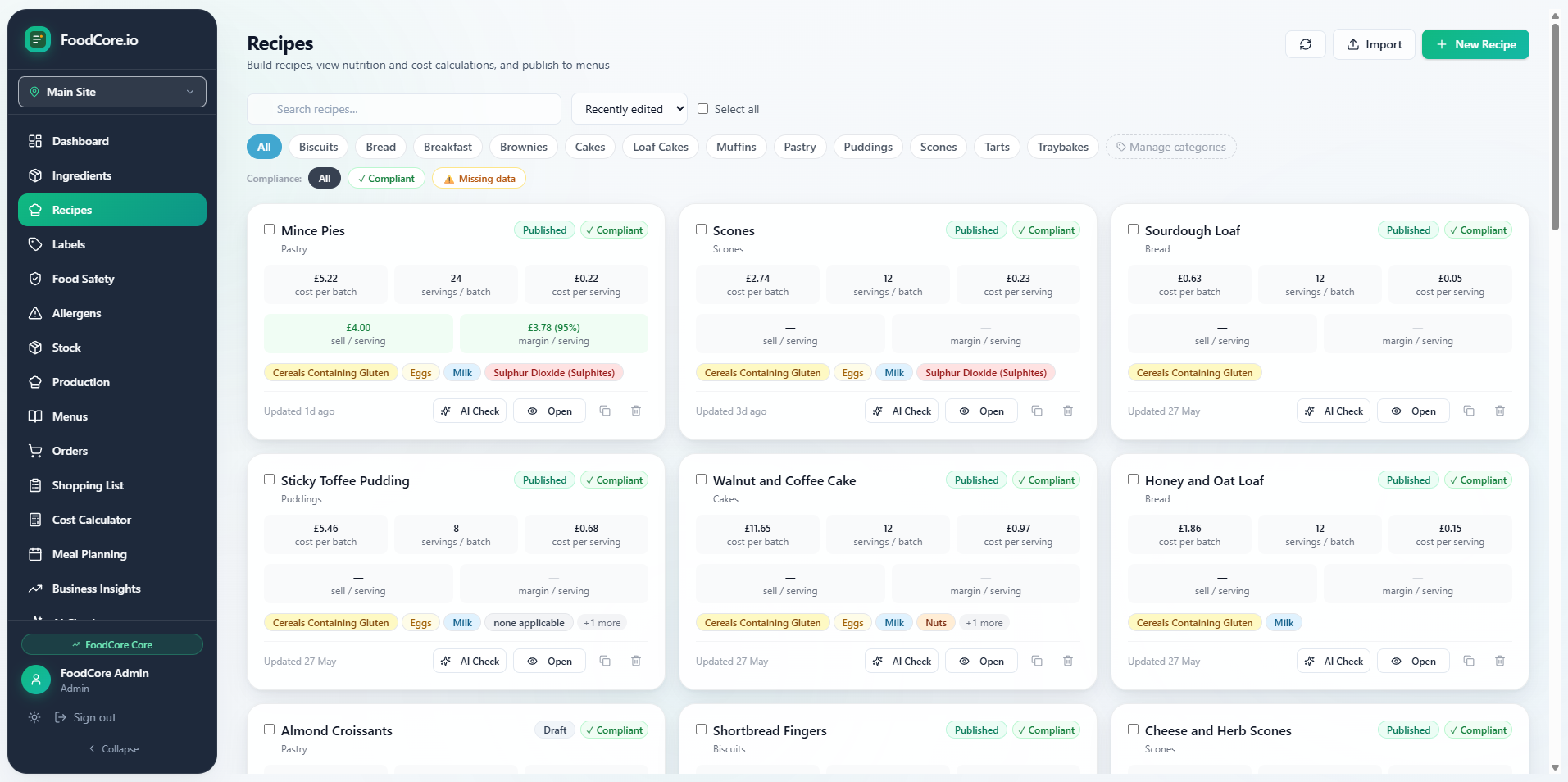
FoodCore.io's recipe costing software works from a central ingredient library where every ingredient is stored with its cost per gram or unit. You build recipes by selecting ingredients and specifying quantities — the software calculates the total ingredient cost of the recipe automatically, and breaks it down so you can see exactly where the cost is coming from.
Because recipes are built from the same ingredient library that powers stock tracking and allergen management, a change to an ingredient — updating a cost, changing a supplier, flagging a new allergen — flows through to every recipe that uses it automatically. You're not maintaining separate systems for costing, stock and allergens; you're maintaining one library that serves all three purposes simultaneously.
When ingredient prices change — which in the current environment they do regularly — you update the price once and every affected recipe reflects the new cost immediately. You can see at a glance which products have been most affected and make pricing decisions based on current data rather than last quarter's estimates.
A real-world example: a meal prep business discovers the truth about its costs
Consider a meal prep business — cooking and delivering fifteen different meal options each week, handling around forty orders. Before using recipe costing software, costs were estimated: the owner had a rough figure for each meal based on a mental tally of the main ingredients, with smaller items like spices, garnishes and sauces grouped into a flat "sundries" estimate.
After setting up a proper ingredient library and building accurate recipes, three things became immediately clear. First, the sundries estimate had been too low across most meals — the small items added up to more than the mental tally suggested. Second, two of the most popular meals had ingredient costs that exceeded 40% of their selling price — fine in theory if volume is high, but tight for a small operation with meaningful packaging and delivery costs. Third, one meal that had always seemed expensive to produce actually had very healthy margins — because the main expensive-feeling ingredient was used in a smaller quantity than assumed.
Armed with this data, the owner repriced two meals, substituted one ingredient in a third, and stopped spending mental energy worrying about the cost of meals that the data confirmed were profitable. The software paid for itself many times over in the first month alone.
Common recipe costing mistakes to avoid
Even with good software, there are pitfalls that undermine the accuracy of your costs:
- Not including waste — if you trim vegetables, lose moisture during cooking, or regularly produce a small percentage of rejected product, these losses need to be factored into your cost calculations. A yield factor per ingredient or recipe gives you a more honest picture.
- Ignoring small ingredients — spices, oils, acids, garnishes. Individually small, collectively significant. Every ingredient that goes into a product should be costed, even if it's a fraction of a gram.
- Using old prices — an ingredient library is only as good as the prices in it. If you haven't updated ingredient costs since last quarter, your cost data is already out of date. Good software makes updating prices fast; the habit of doing it regularly is what makes the data trustworthy.
- Conflating cost and price — recipe costing tells you what a product costs to make. Pricing involves other factors: your target margin, your market positioning, what competitors charge, and what your customers will pay. Costing is the foundation; pricing is the decision you make on top of it.
Getting started: your first recipe costs in an hour
The practical way to start with recipe costing software is to pick your five highest-volume products and cost those first. Build the ingredient library entries you need for those five recipes — this is the most time-consuming part, and it only has to be done once per ingredient — then build the recipes. Within an hour, you'll have accurate cost data on your most important products, and you'll have built the ingredient library entries that power most of your other recipes too.
From there, expanding to your full product range is fast because most of the ingredient work is already done. New recipes mostly use ingredients you've already entered. The ongoing maintenance — updating prices, adding new products — is a matter of minutes rather than hours, because the structure is already in place.
What makes a recipe costing tool right for small food businesses
The market for recipe costing software ranges from free spreadsheet templates to enterprise nutrition and costing platforms. For a small food business, the right tool sits in the middle of that range: purpose-built for food, simple enough to set up without a dedicated implementation project, and priced at a level where the savings it generates clearly outweigh the subscription cost.
The additional factor that matters specifically for small food businesses is integration. A standalone costing tool is useful, but a tool where costing, stock tracking and allergen management share the same ingredient library is more useful still — because it eliminates the duplication and inconsistency that comes from maintaining the same data in multiple places. When your ingredient prices live in one place and everything else derives from them, your data stays accurate with minimal ongoing effort. That's the design goal, and it's the standard worth holding any recipe costing tool to.
FoodCore is kitchen management software for small UK food businesses — recipe costing, allergen tracking, stock management and supplier shopping lists, all connected in one place.
Start free trial →