How Do I Track Ingredients and Batches in My Bakery?
Most bakeries track ingredients in a notebook or a spreadsheet. Both work until they don't — and the failure usually happens at the worst possible moment. Here's a better approach.
The notebook problem
Ask a bakery owner how they track ingredients and batches and you'll often hear a version of the same story: there's a notebook in the kitchen. Batch numbers written in pen. Delivery dates noted on the back of invoices. Stock levels estimated from memory or a quick look at the shelf.
It works — until it doesn't. A week later, the handwriting is illegible. The notebook is under a pile of packaging. Someone else has been using the kitchen and their entries don't match yours. You're not sure if the flour you're using is from the delivery that came in on Monday or the one from the week before.
This isn't a failure of organisation. It's a failure of the system. A notebook is a snapshot tool — it records what happened when you wrote in it, not what's happening now. For ingredient tracking to be useful, it needs to be live, connected to your recipes, and easy to update in the middle of a busy production day.
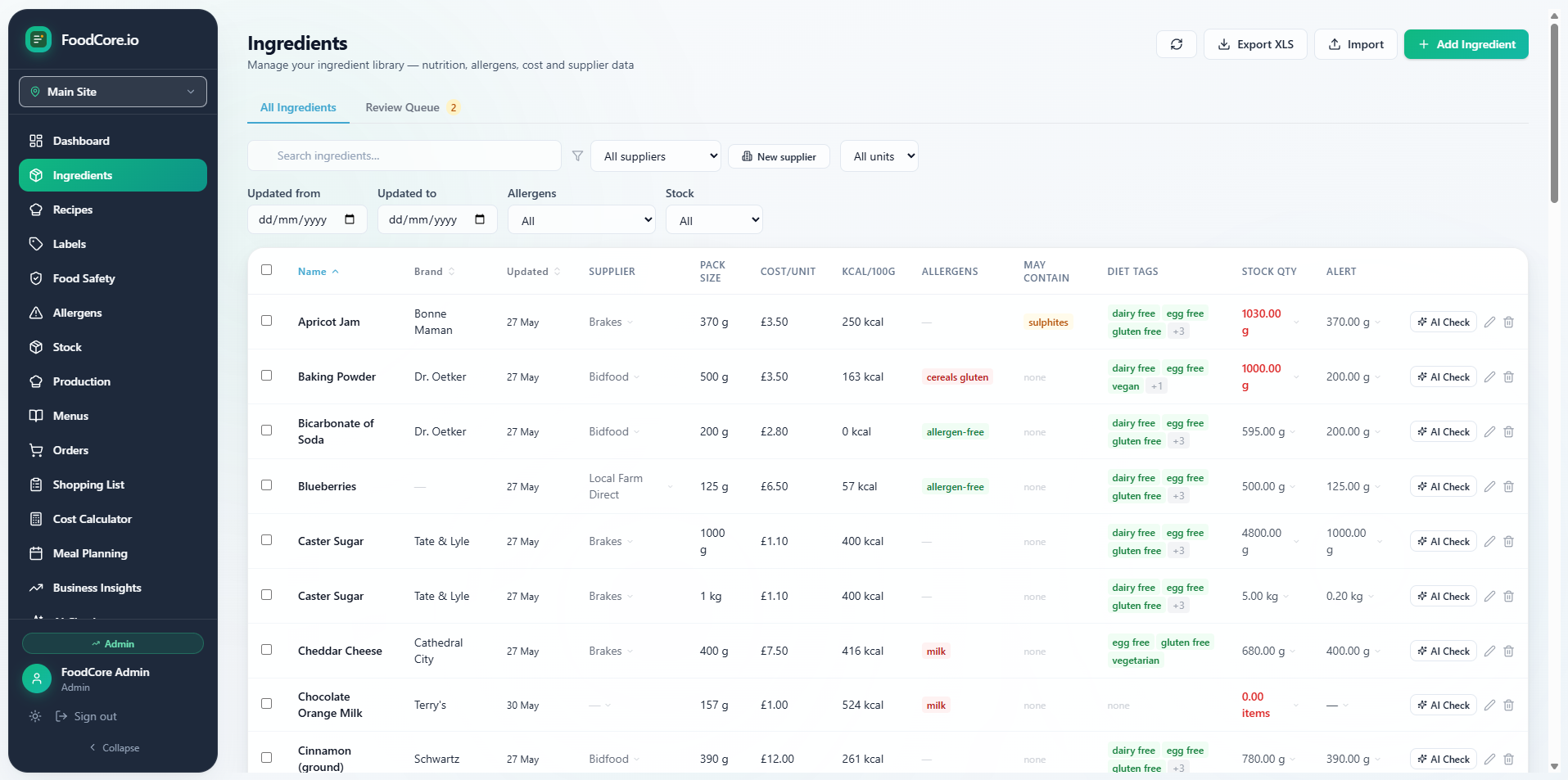
FoodCore ingredients library — costs, allergens, and stock levels in one place
What ingredient tracking actually needs to do
Effective ingredient tracking for a bakery has three components that most manual systems handle separately — or not at all:
1. Know what you have
Stock levels need to reflect what's actually on the shelf, not what was there when you last updated a spreadsheet. In FoodCore, stock is depleted automatically when you log production — if you make 24 croissants using a recipe that calls for 500g of butter, FoodCore deducts 500g from your butter stock. You don't have to update a separate stock spreadsheet.
2. Know what you need
This is where most manual systems fall apart. Calculating what to order for a week's production means going through every recipe you plan to make, totalling up the quantities of each ingredient, and then checking what you already have. For a bakery with 20 products and 50 ingredients, that's a significant calculation — and it's one that FoodCore does automatically.
FoodCore generates a shopping list from your production schedule, filtered by supplier, with quantities calculated from your recipes. What used to take an hour of cross-referencing takes seconds. That's the moment most customers say the tool pays for itself.
3. Know what's in each batch
Batch tracking matters for two reasons: food safety (being able to trace which products used which delivery of an ingredient if there's a recall or quality issue) and consistency (knowing that the recipe you're making today uses the same ingredients as the one you made last week).
FoodCore connects your ingredient library to your recipes, so every batch you produce is linked to the ingredients and quantities used. If you update an ingredient — a new supplier, a different formulation — the change flows through to every recipe that uses it.
The barcode shortcut
One of the biggest barriers to setting up a proper ingredient library is the data entry. Every ingredient needs a name, a unit, a cost, a nutrition panel, and allergen information. For a bakery with 50 ingredients, that's hours of manual typing.
FoodCore's barcode scanning feature eliminates most of this. Point your phone at the barcode on any packaged ingredient and FoodCore imports the full nutrition panel, allergen information, and ingredient list automatically. Most common baking ingredients — flour, butter, chocolate, spice blends — are in the database. You can build your ingredient library while unpacking a delivery.
A gluten-free bakery using FoodCore can trust that every recipe in their library has accurate allergen data — because allergens are tracked at the ingredient level and flow through automatically. For a business where a cross-contamination error has serious consequences, that accuracy isn't a nice-to-have. It's the whole point.
Batch multiplication: the spreadsheet problem no one talks about
One of the specific ways spreadsheets fail for bakery ingredient tracking is batch multiplication. You have a recipe for 12 croissants. You need to make 96 for a wholesale order. You multiply everything by 8 — but the spreadsheet doesn't know you've done this, so your stock depletion calculation is still based on a batch of 12. The numbers stop making sense.
FoodCore handles scaling automatically. Scale a recipe to any number of portions and FoodCore recalculates ingredient quantities, costs, and the shopping list. Your stock levels update based on what you actually produced, not what the base recipe says.
Getting started: the practical approach
- Build your ingredient library first — use barcode scanning to import packaged ingredients quickly. Add loose ingredients (fresh produce, bulk items) manually.
- Set opening stock levels — do a quick stock count and enter current quantities in FoodCore.
- Build your recipes — add ingredients with quantities. FoodCore calculates costs and allergens automatically.
- Log production — when you make a batch, log it in FoodCore. Stock depletes automatically.
- Generate shopping lists — before each order, generate a supplier-filtered shopping list from your production plan.
Most bakeries are up and running in an afternoon. The barcode scanning makes the ingredient library step much faster than it sounds.