How Do Chefs Keep Track of Recipes?
Recipes are the foundation of every food business. They define your product, protect your margins, ensure consistency and underpin your legal compliance. But without a reliable system to manage them, even the best recipes can lead to inconsistency, waste and costly pricing errors. This article traces the evolution of recipe management from paper to dedicated software — and explains what chefs and food business owners actually use today. See our guide to recipe management software.
The old ways: paper recipe cards and ring binders
For generations, professional chefs have relied on handwritten recipe cards — a card index box on the pass, a ring binder in the dry store, or a dog-eared notebook that only one person could read. In domestic kitchens and small home bakeries, the tradition continues: recipes scrawled on the backs of envelopes, torn from magazines, or passed down through families on index cards stained with butter and vanilla extract. See our guide to professional recipe management.
There is something genuinely appealing about a physical recipe — tangible, personal, and satisfying to flick through. But for any food business selling products to customers, paper systems carry serious risks: See our guide to what software restaurants use.
- Lost or damaged cards. A single missing card means a product cannot be made consistently — or at all. Cards get wet, torn, lost in a kitchen move, or simply misfiled.
- No version control. When you tweak a recipe — change a supplier, adjust a yield, reformulate after a price rise — the old version and the new version look identical on paper. There is no audit trail, no date stamp, no way to know which is current.
- Illegible handwriting. In a busy kitchen, a recipe written in haste may be impossible for a different team member to read. Ambiguous measurements ("a knob of butter", "a good glug of oil") lead to inconsistent results.
- No allergen or costing data. A paper card records what goes in, but it cannot automatically flag allergens or calculate the cost per portion. That information lives in someone's head — or nowhere at all.
- Impossible to scale. Scaling a recipe from 12 portions to 60 on paper requires manual arithmetic for every ingredient. Errors are easy, especially under service pressure.
For a home cook making dinner for the family, none of this matters. For a food business producing products for sale, every one of these risks is a genuine liability.
Excel and Google Sheets: an improvement, but only partly
When small food businesses started moving their operations online in the 2000s and 2010s, spreadsheets became the default recipe management tool. And they are a genuine step forward from paper: you can search, copy, paste, and share a spreadsheet with your whole team in seconds. You can sort and filter. You can at least see all your recipes in one place.
But spreadsheets have significant limitations as recipe management tools:
- Manual updates. When an ingredient price changes, you must find and update every recipe that uses it manually. In a product range of 20+ items, this is time-consuming and error-prone. One missed cell means your costings are wrong without you knowing it.
- No allergen tracking. A spreadsheet can hold allergen information, but it has no awareness of what allergens are in each ingredient. If you add a new ingredient to a recipe, the spreadsheet will not automatically flag that you have introduced a new allergen risk.
- No label printing. A spreadsheet cannot generate a Natasha's Law compliant PPDS label. You would need to copy and paste ingredient data into a separate document, manually bold the allergens, and format everything correctly — for every product, every time a recipe changes.
- Easy to break. Spreadsheet formulas are fragile. A single accidental keystroke in a formula cell produces incorrect calculations — and unless you are auditing your formulas regularly, you may not notice for weeks.
- No sub-recipe support. If you make your own pastry that goes into six different pies, tracking the cost and allergens of that pastry as a sub-recipe within each pie is extremely difficult in a spreadsheet. Most businesses simply ignore sub-recipes, which means their costings are inaccurate.
- No team permissions. Everyone with access to a shared spreadsheet can edit anything. There is no concept of read-only access, no change log, no way to prevent accidental overwrites.
For a very small operation with a handful of recipes and one person managing everything, a spreadsheet may be adequate. Once you have more than 10–15 recipes, a growing team, or any compliance obligations, the limitations start to cause real problems.
Is a physical or digital recipe keeper better?
The honest answer depends on what you are using recipes for. For home cooking and hobby baking, a physical recipe book, index card box or even a printed binder is perfectly fine — and arguably more enjoyable to use. There is no compliance requirement, no costing pressure, no team to share with.
For any food business that sells products to customers, a digital recipe management system is not just better — it is effectively essential. The table below sets out the key differences:
The verdict is straightforward: physical recipe keeping is fine for personal use. For any food business — whether that is a home bakery, a cake shed, a meal prep company or a catering operation — digital recipe management is the only system that can keep pace with compliance, costing and scale requirements.
What professional chefs actually use
Recipe management varies considerably depending on the size and type of the food operation:
Large commercial kitchens and restaurant groups
At scale, professional kitchens typically use recipe management modules built into their ERP or POS systems — platforms like Fourth, Lightspeed, or Oracle MICROS. These systems integrate recipe management with stock control, purchasing and labour scheduling. They are powerful, but also expensive, complex to implement, and designed for operations with dedicated IT resource. A restaurant group running multiple sites will use these systems to ensure that a dish is costed identically whether it is produced in Manchester or London.
In Michelin-starred kitchens, recipes are often stored in proprietary chef-developed systems, or in highly structured digital documents maintained by the head chef. A key requirement at this level is standardised yield — knowing precisely what percentage of a raw ingredient survives trimming, cooking and portioning, so that costing remains accurate at high volume.
Independent restaurants and food businesses
Independent chefs and small food business owners are increasingly moving to dedicated recipe management software — tools designed specifically for food businesses rather than adapted from general accounting or ERP platforms. These businesses typically need:
- Standardised yields. The ability to record that 1kg of chicken breast yields 820g after trimming, so costs are based on usable weight rather than purchase weight.
- Sub-recipes. The ability to create a component (a sauce, a pastry, a spice blend) as its own recipe, and then use it as an ingredient in other recipes — with costs and allergens flowing through automatically.
- Scaling. The ability to scale a recipe up or down by a multiple, or to a target portion count, without manual arithmetic.
- Allergen flags. Automatic identification of which of the 14 major allergens are present in each recipe, based on the ingredients used.
- Label printing. The ability to print a Natasha's Law compliant PPDS label directly from the recipe — with the full ingredient list and allergens bolded — without any manual data entry.
What are the 5 P's of cooking?
The 5 P's of cooking is a framework used in culinary training and professional kitchen management to describe the pillars of consistent, high-quality food production. They are:
1. Preparation
Everything done before cooking begins — mise en place, measuring, weighing, prepping ingredients. Standardised recipes make preparation faster and more consistent, because every team member follows the same method in the same sequence with the same quantities.
2. Processes
The cooking methods, techniques and sequences used to produce a dish — sautéing, braising, tempering, baking. Documented processes captured in a recipe management system ensure that a product tastes the same whether the head chef or a new team member makes it.
3. Produce
The quality, provenance and specification of raw ingredients. Good recipe management software links directly to your ingredient database, so you always know exactly what produce goes into each product, where it comes from, and what it costs.
4. People
The skill and knowledge of the team producing the food. Team access to a shared recipe management system means everyone works from the same version of every recipe — there is no confusion about which version is current, and no reliance on one person's memory.
5. Presentation
The final appearance and packaging of the product. For food businesses, presentation includes labelling — and Natasha's Law compliance is a legal requirement for any pre-packed food sold directly to consumers. A recipe management system that generates compliant labels directly from your recipes makes presentation not just consistent, but legally watertight.
Recipe management software is the system that underpins all five P's: it standardises preparation, documents processes, tracks produce costs, gives people shared access to accurate recipes, and enables compliant presentation through automated label generation.
What to look for in recipe management software
If you are evaluating recipe management software for your food business, here is the checklist that matters:
- Ingredient database with pricing. You should be able to build a database of all your ingredients with unit costs, so that recipe costs calculate automatically and update when prices change.
- Allergen flagging. The software should automatically identify which of the 14 major allergens are present in each recipe, based on the ingredients you have used. Manual allergen tracking is too error-prone for compliance purposes.
- Costing and margin calculation. You should be able to see the cost per portion, the food cost percentage, and your gross margin for every recipe — without any manual calculation.
- Label printing. The software should generate Natasha's Law compliant PPDS labels directly from your recipes, with ingredients listed in descending weight order and allergens bolded. This saves significant time and eliminates transcription errors.
- Scaling. You should be able to scale any recipe to any portion count with a single input — not manual arithmetic for every ingredient line.
- Team access. Multiple team members should be able to access recipes simultaneously, with appropriate permissions to control who can edit and who can only view.
How FoodCore handles recipe management
FoodCore is kitchen management software built specifically for small UK food businesses — home bakers, market stall operators, meal prep companies, small catering businesses, cake sheds and independent food producers. Recipe management is at the core of everything FoodCore does.
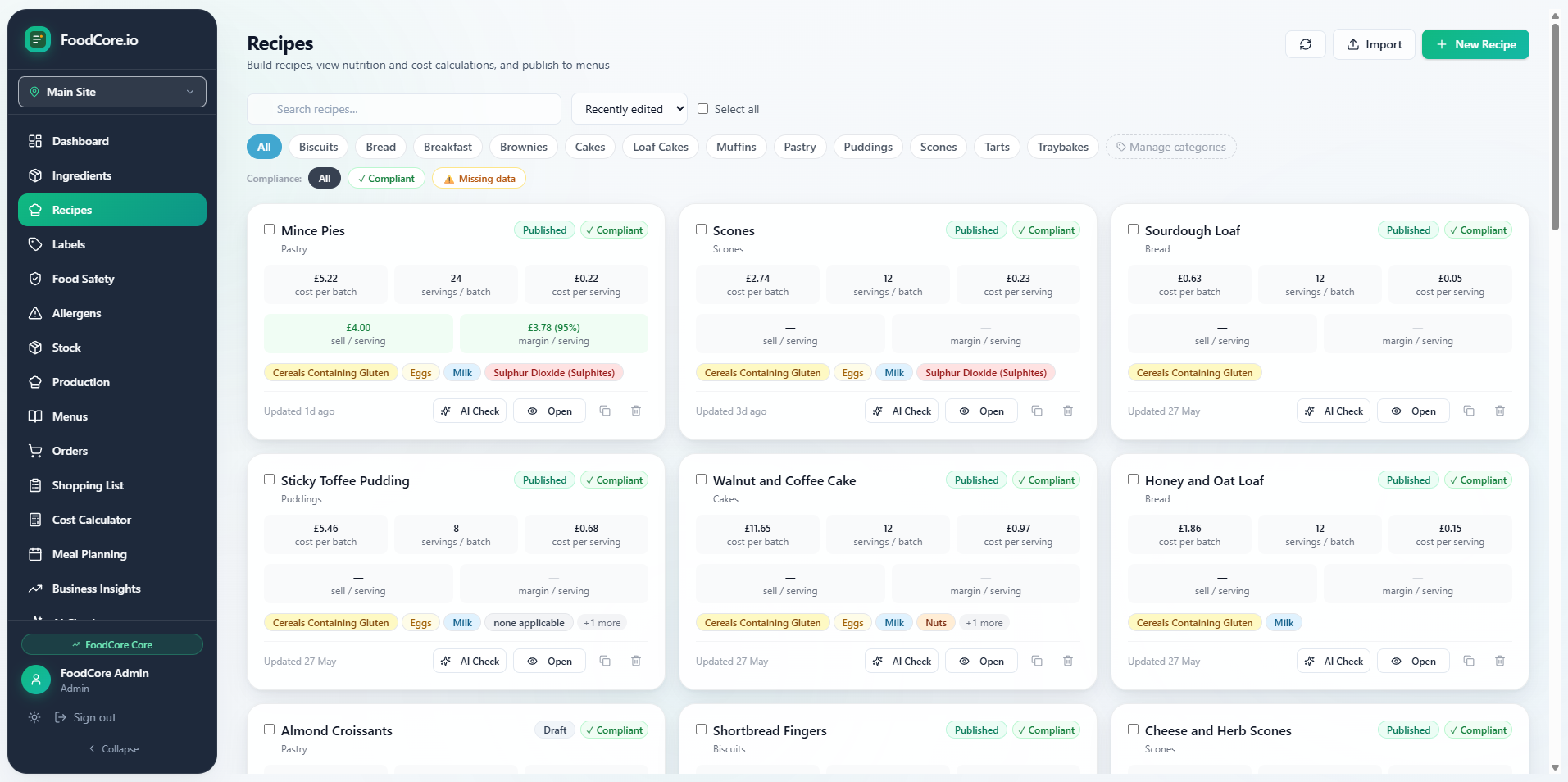
When you add a recipe to FoodCore, you build it from your ingredient database — each ingredient already has a unit cost and allergen data attached. As you add ingredients, FoodCore automatically calculates the cost per portion, the food cost percentage, and your gross margin at your target selling price. It also identifies every allergen present in the recipe, with no manual tagging required.
FoodCore supports sub-recipes, so if you make your own buttercream that goes into multiple cake recipes, you enter it once and use it across your whole range — with costs and allergens flowing through correctly every time. Scaling is handled with a single input: enter the number of portions you need and every ingredient quantity adjusts instantly.
From any recipe, you can print a Natasha's Law compliant PPDS label in seconds — ingredients listed in the correct order, all 14 allergens bolded wherever they appear, no copy-and-paste required. The screenshot below shows FoodCore's recipe and nutrition view, where all this information is displayed in a single dashboard.
FoodCore is available from £25/month on the Essentials plan, which includes unlimited recipes, full allergen tracking, and label printing. Learn more about FoodCore recipe management →
FoodCore is kitchen management software for small UK food businesses — recipe costing, Natasha's Law labels, shopping lists and order tracking.
Get started →